For software teams
Your AI journey, with Fluentor as mentor.
In five minutes you see where you stand with AI in your work. Then Fluentor supports you all the way: your next step, curated tips and your progress over time. For you, and for your whole team.
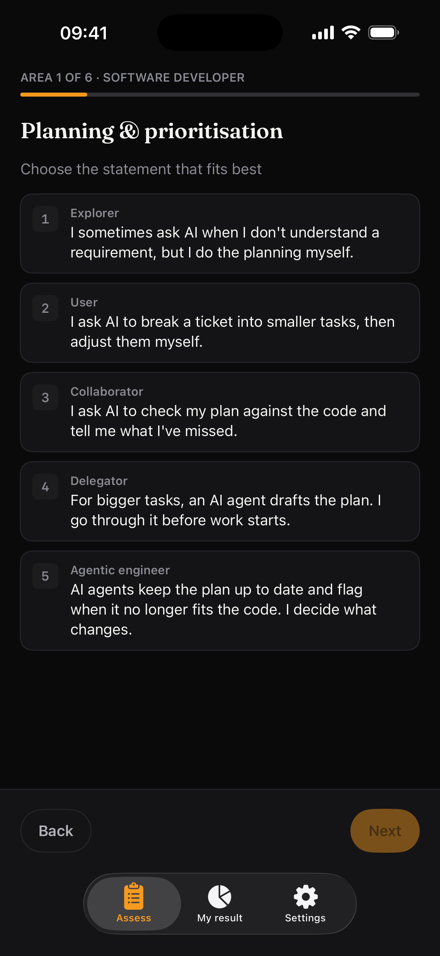
Planning An example from the developer role. Pick the statement that fits you best.
-
Explorer I sometimes ask AI when I don't understand a requirement, but I do the planning myself.
-
User I ask AI to break a ticket into smaller tasks, then adjust them myself.
-
Collaborator I ask AI to check my plan against the code and tell me what I've missed.
-
Delegator For bigger tasks, an AI agent drafts the plan. I go through it before work starts.
-
Agentic AI agents keep the plan up to date and flag when it no longer fits the code. I decide what changes.
-
01
See where you stand
In each area, pick the statement that describes how you work today. It takes about five minutes.
-
02
Take the next step
Your result shows your level in each area and what the next level asks of you. With the Guidance module you pick one next step and get tips on how to take it.
-
03
Keep going
When your work has changed, update a single area or take the whole assessment again. Every result is kept, so you can see which way things are going.
Where you stand, area by area
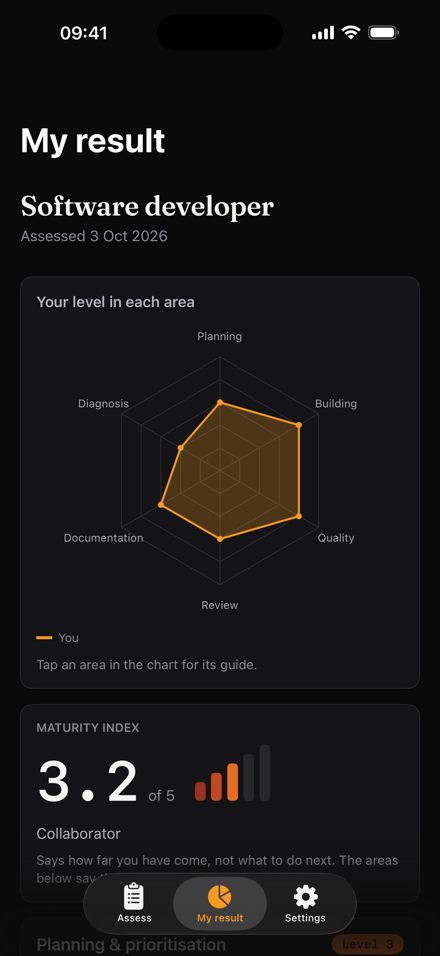
You get a result for each area, with a guide to the next level. The maturity index is the average of all the areas' results.
- You
- Target
To reach the next level
Let an AI agent draft the plan for your next big task. Go through it before anyone starts coding.
Write down how your team works so the AI agents can follow it. Then several can work at once while you review.
Ask AI where the code could break before you write the tests.
Let an AI agent review every PR before you do. Spend your time on what it misses.
Show AI the code when you write docs, and ask what a new colleague wouldn't understand.
Let an AI agent pick up CI failures and suggest a fix. You're the one who merges.
Tap an area to see its guide.
Support all the way on your journey
The assessment is where it starts. Fluentor is with you on the journey after it.
Know what comes next
See what the next level looks like in every area, in plain words.
One step at a time
Pick one next step and get tips on how to take it. Small, concrete and made for your role.
See your progress
Every result is kept. Update one area when your work changes and watch the trend build.
Keep the team moving
Shared targets, the trend over time, and a reminder for whoever hasn't answered.
On the way
Your journey where you already work
We are exploring how to bring your next steps into the tools you already use for tasks, planning, reminders and your calendar, such as Jira and Monday, and into your AI chat app. You connect them yourself, and they see only what you can see.
- Jira
- Monday
- Your calendar
- Your AI chat app
Five levels along the way
From sometimes asking AI for help to setting the limits for AI agents that do the work. The levels draw on Anthropic's AI Fluency framework and DORA's research on AI in software development.
-
01
Explorer
Asks AI now and then, but does the work themselves.
-
02
User
Lets AI write drafts, then corrects them.
-
03
Collaborator
Works with AI and lets it push back.
-
04
Delegator
Gives AI agents whole tasks and reviews the result.
-
05
Agentic
Sets the limits and lets AI agents do the work.
On the go
Between assessments
The assessment takes a few minutes. Reaching the next level can take weeks. The app comes along in the meantime.
See what the next level looks like in any area.
Get a reminder when your organisation's next round is due. With Guidance, you can also get tips for a next step you've picked, as often as you like.
Take the assessment whenever it suits you, even without signal. Your answers are saved and sync when you're back online. Owners and managers can see the team overview in the app too.
For iPhone, in testing. Not in the App Store yet.
You know who sees what
Honest answers need you to know who reads them, so it's clear from the start who sees what.
-
Your assessment is private until you submit it. After that, the managers above you and the organisation's owner see your result, including earlier results you've submitted, unless the owner has chosen that nobody does.
-
Colleagues don't see your result. If you want to show someone, you create a link.
-
Averages are for the owner and the managers. Colleagues see neither each other's results nor an average they could work one out from.
-
Your answers and your account are stored in Stockholm. You sign in without a password, and your answers are never used to train AI.
Prices
Individual
Free
One person
- Self-assessment in any role
- Result per area and a maturity index
- A guide to the next level in every area
- The model's target levels
- History of earlier assessments
- The Guidance module
Team
39 kr / seat / month
45 kr without an annual agreement. Any size.
- The first five seats are free
- A role for each person and your own targets
- Team radar, heatmap and trend
- Billed monthly in arrears
The first five seats are free every month, in the first organisation each owner creates. With an annual agreement a seat costs 39 kr a month, without one 45 kr, billed in arrears. A seat counts every month someone is a member, from the month they accept the invitation. The owner counts as a seat too. An invitation not yet accepted costs nothing. All prices exclude VAT. Modules, such as Guidance, are available to individuals and to teams.
We let people in in rounds. Free for individuals. The assessment takes about five minutes.